Dingo is a Cardano blockchain node written in Go which actively participates in network communications on the Cardano blockchain using the Ouroboros Network Node-to-Node family of mini-protocols.
⚠️ Dingo is a work in progress and is currently under heavy development
In this guide, we will walk you through downloading and running the Cardano CLI binary, then demonstrate several Cardano CLI commands. To get started follow the steps below.
✅ This guide we assumes you have already downloaded Dingo and synced the blockchain. If not, see our Quick Start guide.
You can either download the binary and move the file to your preferred location or…
Copy the download URL for the latest Cardano CLI binary and run the following command:
⚠️ For this example we place the cardano-cli binary in our ~/dingo directory. Adjust the link path to the correct path for the version you want to download.
cd ~/dingo
wget https://github.com/IntersectMBO/cardano-cli/releases/download/cardano-cli-11.0.0.0/cardano-cli-11.0.0.0-x86_64-linux.tar.gz -O - | tar -xz
Step 2 - Rename the Cardano CLI Binary and Set Execute Permissions
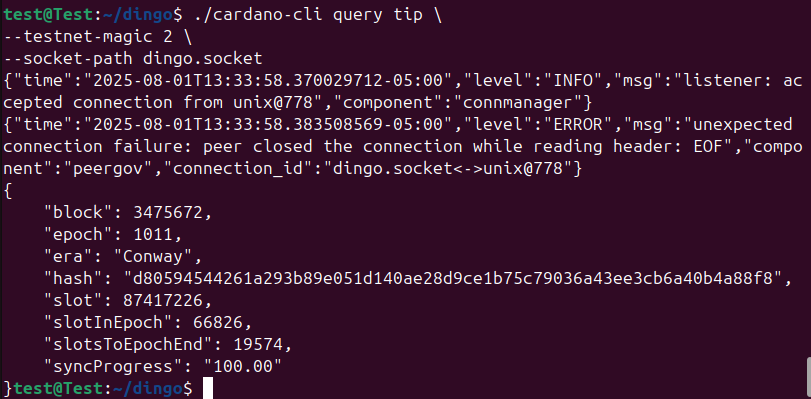
Let’s run our first Cardano CLI command to query the tip of the Preview network using the Dingo node.
Run the following command to query the tip:
./cardano-cli query tip \
--testnet-magic 2 \
--socket-path dingo.socket
⚠️ Please note: The --socket-path shown above assumes you downloaded cardano-cli into your ~/dingo directory. If you installed cardano-cli elsewhere, adjust the path accordingly. You can use realpath dingo.socket to determine the absolute path to dingo.socket.