
Command Line Guide
We can now use the command line to create a Cardano wallet and output all the files we will need to manage the wallet. We can also start the API and access the API Swagger documentation.
Bursa can also be used to generate multi-signature scripts, hashes, keys, including keys and certificates needed to run a Cardano stake pool.
There are currently 11 categories of commands that Bursa can run which makes it a power tool for Cardano users.
Bursa Command Categories
- wallet - Commands for generating wallet and the files needed to manage a Cardano wallet
- api - Commands for running API
- kes-agent - Commands for running the KES agent daemon for a Cardano block producer
- cert - Commands for generating various Cardano certificates
- hash - Commands for generating cryptographic hashes used in Cardano
- script - Commands for multi-signature operations
- address - Commands for working with Cardano addresses
- key - Commands for deriving individual keys from a mnemonic
- tx - Offline transaction operations
- sign - CIP-8/CIP-30 message signing and verification
- signer - Remote signing service
Use Command Line to Create a Wallet and Output Wallet Files
Section titled “Use Command Line to Create a Wallet and Output Wallet Files”We can use the command line to create a wallet and output all the files we will need to manage our Cardano wallet.
✅ For this example we create the wallet files to the dev folder by using the --output flag and giving it a directory to output to.
./bursa wallet create --output dev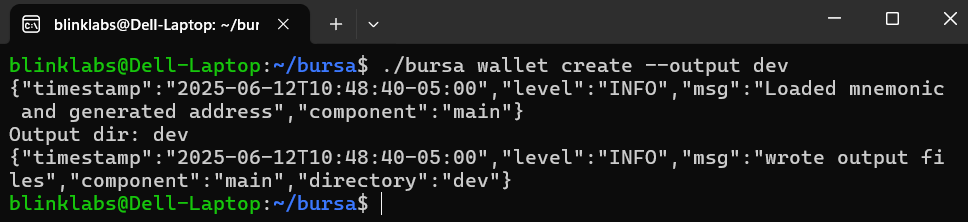
Now we will have all the wallet files in our dev directory.

Restore and inspect a wallet
Section titled “Restore and inspect a wallet”Restore an existing BIP-39 mnemonic from a protected file, then inspect the generated key files:
./bursa wallet restore --mnemonic-file dev/seed.txt --output restored-wallet./bursa wallet load --dir restored-wallet--output writes addresses and key files; without it, restoration logs addresses only. Restoration does not copy the mnemonic into the output directory. Keep mnemonic and signing-key files private and backed up securely. Mnemonic sources are checked in this order: deprecated --mnemonic, MNEMONIC environment variable, --mnemonic-file, then the default seed.txt file. Unset MNEMONIC when using --mnemonic-file. The --mnemonic and --password arguments are deprecated because process arguments are visible to other local users; use --mnemonic-file and --password-file instead. Use --password-file /path/to/password.txt if the wallet was derived with a BIP-39 password; this is a derivation password, not encryption for the output files.
wallet load reads existing key files without deriving a new wallet. Private key hex is hidden by default; --show-secrets explicitly reveals it. Use ./bursa wallet restore --help and ./bursa wallet load --help for the available options.
Use Command Line to Start API
Section titled “Use Command Line to Start API”If we want to use the API we can use the command line to start it, by running the following command.
./bursa api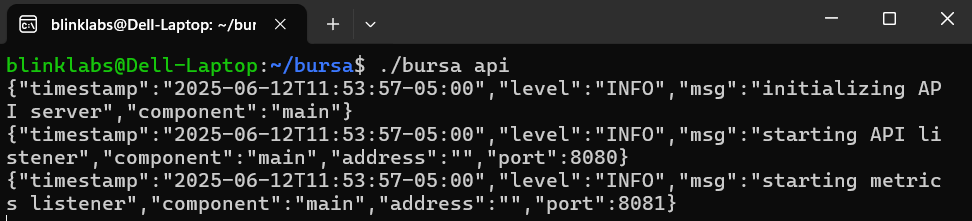
Access API Swagger Documentation
Section titled “Access API Swagger Documentation”You can check the Bursa API by going to your IP:port/swagger/index.html. Please adjust the IP and your port if needed.
http://localhost:8080/swagger/index.html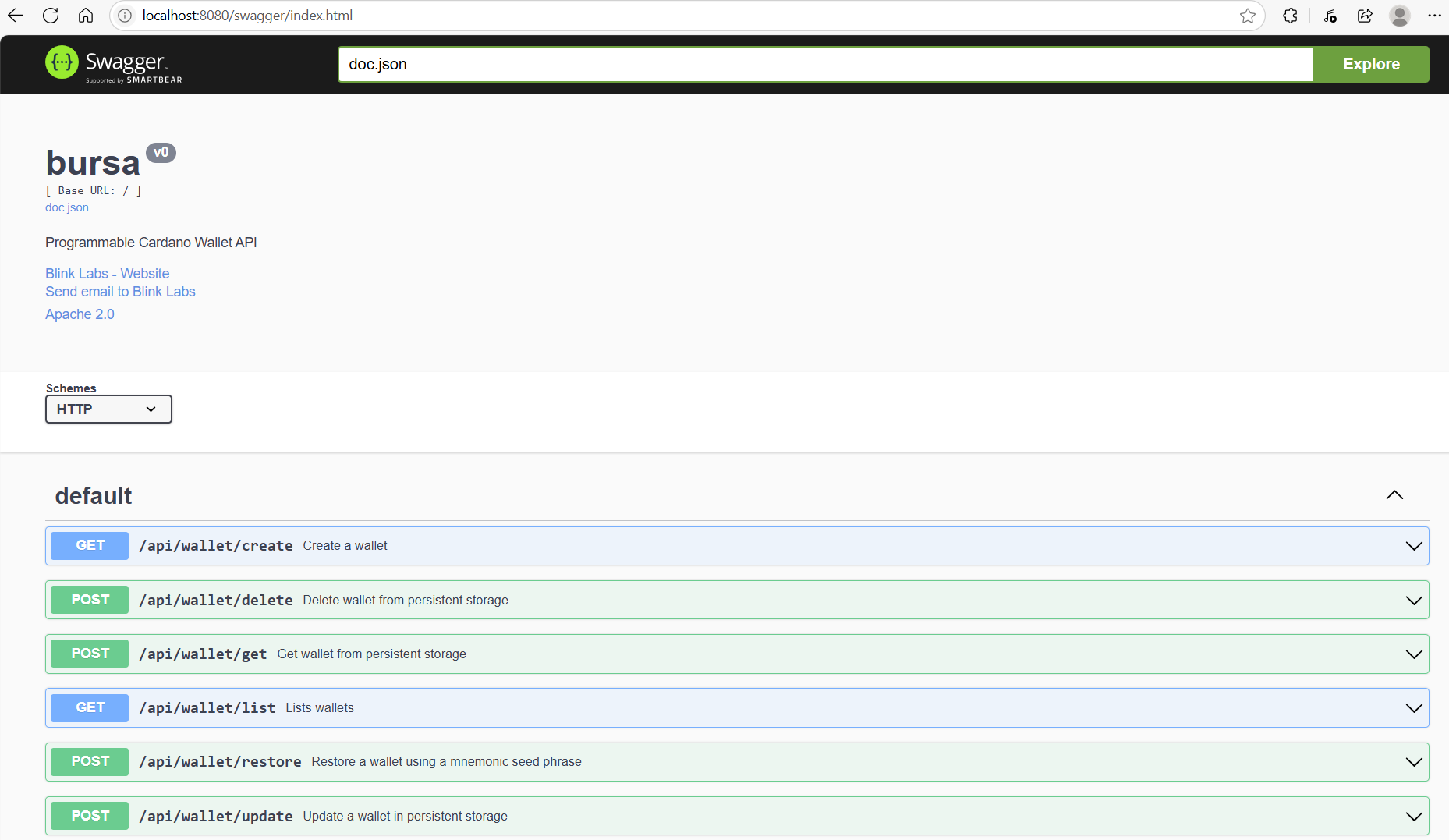
For non-loopback listeners, use the configuration reference to configure TLS and exactly one bearer authentication trust source.
Use Command Line to Start KES Agent
Section titled “Use Command Line to Start KES Agent”Start the KES agent daemon for a Cardano block producer with a YAML configuration file:
./bursa kes-agent --config /path/to/kes-agent.yamlThe --config flag selects the YAML configuration file. When the flag is omitted, Bursa uses the BURSA_CONFIG environment variable. Configure the kes_agent.mode value as serve-key or sign. Use the configuration reference for the kes_agent YAML fields and environment variables, including the mode and required socket, key, and timing settings.
Control the KES agent
Section titled “Control the KES agent”Use bursa kes-agent control to send a command to a running local KES agent through its control socket:
./bursa kes-agent control [--config /path/to/kes-agent.yaml] [--socket /run/bursa/kes-agent-control.sock] [--profile PROFILE] <command>An explicit --socket value takes precedence. Without --socket, the command reads kes_agent.control_socket from the YAML file selected by --config; when --config is omitted, BURSA_CONFIG selects that file. The command does not discover a control socket from another source. See the configuration reference for kes_agent.control_socket, socket permissions, and configuration-file selection.
Use --profile to select the profile affected when the agent serves several profiles. Without --profile, info lists every profile; a single-profile agent can omit the profile name.
The control command provides these subcommands:
infoprints the agent state. It does not require additional flags.gen-staged-key [--out FILE]generates a staged key. The optional--outflag writes the KES verification key as acardano-clienvelope, prints the JSON reply before attempting the write, and refuses to overwrite an existing file.install-key --opcert FILEinstalls a staged key from aNodeOperationalCertificatecardano-clienvelope. The command requires the--opcertflag.drop-key --target VALUEdrops key material. The--targetflag is required and accepts onlystaged,active, orall.
The command prints agent replies as JSON and represents byte fields as hexadecimal. An agent refusal causes a non-zero CLI exit. Each control request has a 30-second limit, and cancellation ends blocked socket I/O promptly.
Rotate a KES key in three steps:
-
Generate the staged key and write its verification key to an envelope:
./bursa kes-agent control --config /etc/bursa/kes-agent/config.yaml gen-staged-key --out kes.vkey -
Issue an operational certificate for
kes.vkeyoffline with the pool cold key. The agent does not issue the certificate. -
Install the certificate and inspect the result:
./bursa kes-agent control --config /etc/bursa/kes-agent/config.yaml install-key --opcert node.cert./bursa kes-agent control --config /etc/bursa/kes-agent/config.yaml info
Offline transaction operations
Section titled “Offline transaction operations”The tx commands inspect and sign an existing transaction without contacting a node. Supply unsigned.tx as hex CBOR or a JSON text envelope containing cborHex:
./bursa tx decode --tx-file unsigned.tx./bursa tx id --tx-file unsigned.tx./bursa tx sign --tx-file unsigned.tx \ --signing-key-file dev/payment.skey --era Conway --out-file signed.txRepeat --signing-key-file to add multiple signers. The optional --era flag accepts Shelley, Allegra, Mary, Alonzo, Babbage, Conway, or Dijkstra without regard to letter case. Use it with tx sign, tx witness, or tx assemble when raw CBOR or a legacy era-less Tx envelope does not identify a single era:
./bursa tx witness --tx-file unsigned.tx \ --signing-key-file dev/payment.skey --era Conway --out-file payment.witness./bursa tx assemble --tx-file unsigned.tx \ --witness-file payment.witness --era Conway --out-file assembled.txRepeat --witness-file to include additional witnesses. Bursa uses an era named in a text envelope and requires it to match --era when both are present. Raw hex and a legacy era-less Tx envelope work without --era only when the CBOR resolves to one era. If the CBOR is valid in more than one era, Bursa does not guess: provide --era or an era-typed envelope such as Tx ConwayEra. An unknown era or a conflict between the envelope and --era fails.
Signing and assembly write JSON text envelopes to --out-file, or to standard output when it is omitted. Signed and assembled outputs use TxSignedShelley for Shelley, Tx <Era>Era for Allegra through Dijkstra, such as Tx ConwayEra, and plain Tx for Byron. Detached witnesses use TxWitness <Era>Era for Shelley through Dijkstra, such as TxWitness ConwayEra, and plain TxWitness for Byron.
The /api/tx/sign and /api/tx/assemble endpoints resolve the era from tx_cbor. When raw or era-less CBOR is valid in multiple eras, the request returns HTTP 400 unless tx_cbor uses an era-named text envelope such as Tx ConwayEra; the response includes remediation guidance. tx decode --protocol-params protocol-parameters.json also estimates the minimum fee from a Cardano protocol-parameters JSON file. Use ./bursa tx --help and each subcommand’s --help for options.
The --era option is available on tx sign, tx witness, and tx assemble. For raw or era-less CBOR that is valid in more than one era, --era is required; for example:
./bursa tx sign --tx-file unsigned.tx --era conway \ --signing-key-file dev/payment.skey --out-file signed.txBursa resolves the era from an era-typed JSON text envelope, such as one with type Tx ConwayEra, when the flag is absent. Without --era, Bursa accepts raw or era-less CBOR only when it decodes unambiguously. Provide --era or an era-typed envelope when the input is ambiguous. The command fails when --era conflicts with the era declared by the input envelope.
The resolved era selects the output envelope type and witness encoding for signing, witnessing, and assembly.
Sign and verify messages
Section titled “Sign and verify messages”sign data produces a CIP-8/CIP-30 COSE signature and public key as JSON. Set ADDRESS_HEX to the hex-encoded address bytes for the signing key (rather than the Bech32 address text). After signing, set SIGNATURE_HEX and COSE_KEY_HEX to the returned signature and key fields:
./bursa sign data --address "$ADDRESS_HEX" --payload 'Hello Cardano' \ --signing-key-file dev/payment.skey./bursa sign verify --signature "$SIGNATURE_HEX" --key "$COSE_KEY_HEX" \ --payload 'Hello Cardano'Use --payload-hex instead of --payload for binary data. Verification with the expected payload prints VALID on success and exits with an error if verification fails.
Start the remote signing service
Section titled “Start the remote signing service”The signer command serves authenticated remote signing requests with configured custody backends, caller permissions, key policies, and anti-double-sign watermarks:
./bursa signer --config /path/to/signer.yamlWhen --config is omitted, BURSA_CONFIG selects the YAML file. Configure at least one authentication mode; JWT bearer, mTLS client certificates, and authorized-key request signatures are supported. Before starting the service, follow the signer runbook and adapt the example signer configuration for custody, authentication, TLS, caller permissions, and durable watermarks. The signer overview links the API specification and security guidance.
Explore other Bursa Commands
Bursa Command Categories
- wallet - Commands for generating wallet and the files needed to manage a Cardano wallet
- api - Commands for running API
- kes-agent - Commands for running the KES agent daemon for a Cardano block producer
- cert - Commands for generating various Cardano certificates
- hash - Commands for generating cryptographic hashes used in Cardano
- script - Commands for multi-signature operations
- address - Commands for working with Cardano addresses
- key - Commands for deriving individual keys from a mnemonic
- tx - Offline transaction operations
- sign - CIP-8/CIP-30 message signing and verification
- signer - Remote signing service

Docs authored by Doc Holiday